


Brand: SainSmart
[Discontinued] 3DMakerpro Seal Lite 3D Scanner for 3d Printing and Modeling, 0.02mm Accuracy 10 Fps Scan Speed, Anti-Shake Lenses
[Discontinued] 3DMakerpro Seal Lite 3D Scanner for 3d Printing and Modeling, 0.02mm Accuracy 10 Fps Scan Speed, Anti-Shake Lenses
SKU: 101-91F-SLS-AE
Regular price
$359.00
-Liquid error (snippets/price line 166): divided by 0
Regular price
Sale price
$359.00
Unit price
per
%3Cp%3EEarn%20[points_amount]%20when%20you%20buy%20this%20item.%3C/p%3E
Shipping & Tax calculated at checkout.
- 101-91F-SLS-AE
- 101-91F-SLS-AE
- 101-91F-SLS-AE
- 101-91F-SLS-AE
Couldn't load pickup availability
- Capture Precise Details: Step into the world of precision with Seal Lite. Achieve an astounding 0.02mm accuracy, thanks to refined structured light and the Precision Blue imaging system. Explore the intricacies of 3D modeling with a minimum point spacing of 0.07mm and Precision Blue imaging system.
- Smooth Scanning: Seal Lite's advanced Optical System and JMStudio algorithms ensure a smooth scanning experience. The built-in Anti-Shake Lenses and optical stabilization function filter out unwanted jitter to achieve smooth and continuous scanning.
- Lightweight & Quiet: Designed to be taken anywhere, anytime, Seal Lite weighs only 225g. It is equipped with excellent heat dissipation and operates without any fan noise.
- Brilliant in Darkness: Seal Lite supports scanning in the dark with its 9-level light adjustment for versatile scanning in different colors, materials, and lighting conditions. Collecting 100,000 points per second, it's your go-to for scanning body parts, models, art, fashion, and more.
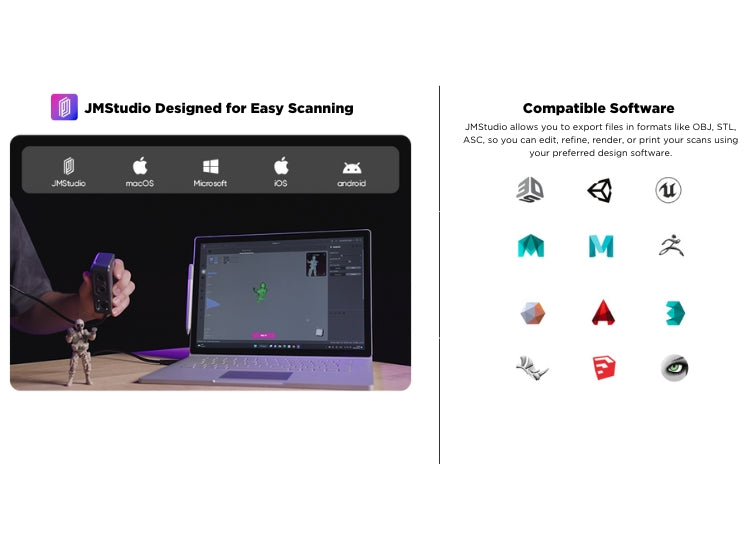
- Simplicity Meets Affordability: Ease of use doesn't have to come at a high cost. Seal Lite's user-friendly design is complemented by its cost-effective software. The JMStudio software, designed for simplicity and compatibility, allows you to customize, process, and export files effortlessly.
![[Discontinued] 3DMakerpro Seal Lite 3D Scanner for 3d Printing and Modeling, 0.02mm Accuracy 10 Fps Scan Speed, Anti-Shake Lenses.](http://www.sainsmart.com/cdn/shop/files/SealLite3DScanner-1.jpg?v=1706257407&width=1445)
![[Discontinued] 3DMakerpro Seal Lite 3D Scanner for 3d Printing and Modeling, 0.02mm Accuracy 10 Fps Scan Speed, Anti-Shake Lenses.](http://www.sainsmart.com/cdn/shop/files/SealLite3DScanner-4.jpg?v=1706257407&width=1445)
![[Discontinued] 3DMakerpro Seal Lite 3D Scanner for 3d Printing and Modeling, 0.02mm Accuracy 10 Fps Scan Speed, Anti-Shake Lenses.](http://www.sainsmart.com/cdn/shop/files/SealLite3DScanner-6_520bb188-fc29-433f-9ef9-eaf33c17afcc.jpg?v=1716195053&width=1445)
![[Discontinued] 3DMakerpro Seal Lite 3D Scanner for 3d Printing and Modeling, 0.02mm Accuracy 10 Fps Scan Speed, Anti-Shake Lenses.](http://www.sainsmart.com/cdn/shop/files/SealLite3DScanner-7_b72c0a64-4dfc-4206-ad94-7d5f6789eaef.jpg?v=1716195058&width=1445)
![[Discontinued] 3DMakerpro Seal Lite 3D Scanner for 3d Printing and Modeling, 0.02mm Accuracy 10 Fps Scan Speed, Anti-Shake Lenses.](http://www.sainsmart.com/cdn/shop/files/SealLite3DScanner-2.jpg?v=1706257407&width=1445)
![[Discontinued] 3DMakerpro Seal Lite 3D Scanner for 3d Printing and Modeling, 0.02mm Accuracy 10 Fps Scan Speed, Anti-Shake Lenses.](http://www.sainsmart.com/cdn/shop/files/SealLite3DScanner-3_7cccc19f-a4c1-4037-b18c-1447889d2681.jpg?v=1716195061&width=1445)
![[Discontinued] 3DMakerpro Seal Lite 3D Scanner for 3d Printing and Modeling, 0.02mm Accuracy 10 Fps Scan Speed, Anti-Shake Lenses.](http://www.sainsmart.com/cdn/shop/files/SealLite3DScanner-5_67819688-a643-448b-b250-ef61238dbd7a.jpg?v=1716195065&width=1445)

Introducing Seal Lite: your gateway to
the world of high-precision 3D modeling. Capture even the tiniest details with stunning 0.02mm accuracy and explore
intricate object structures with a minimum point spacing of 0.07mm. Smooth scanning is guaranteed with advanced
Anti-Shake technology and powerful JMStudio software. This lightweight, quiet scanner goes anywhere, scans anything,
even in the dark, thanks to its adaptable lighting controls. Seal Lite's affordability, ease of use, and AI-powered
software make it the perfect tool for aspiring creators to bring their visions to life. Step into the future of 3D
modeling with Seal Lite!


FAQ
Which operating systems does the scanning software support?
- The scanning software seamlessly supports Windows 10/11 (64-bit), MacOS 12/13. For mobile connectivity with Smart Grip (sold separately): Android 10.0 or later, iOS 15.0 or later.
Can scanned models be directly 3D printed?
- Absolutely! STL files can be directly imported into all slicing applications for a hassle-free 3D printing experience.
Is it necessary to apply markers during scanning?
- No need for markers! Seal/Seal Lite utilizes 3DMakerpro's visual tracking technology, eliminating the requirement for markers during scanning.
Is an Internet connection required for operation?
- Yes, an Internet connection is needed initially for downloading the scanning software and loading calibration files. However, the offline operation is supported thereafter.
Is professional training necessary to use the scanner?
- Not at all! We provide comprehensive beginner guides, and many users can skip these guides and start scanning directly. Our focus is on making scanning easy – concentrate on your creations, not on adjusting parameters.
Specifications
| Specification | Value |
| Accuracy | 0.02mm |
| Frame rate | 10fps |
| Resolution | 0.07mm |
| Work distance | 180-280mm |
| Single capture range | 100*75mm |
| Tracking mode | Visual tracking |
| Light source | Blue light |
| Color Texture | Mono textures |
| Output Format | OBJ / STL / PLY / ASC |
| Compatible System | Win 10/11 (64-bit) / Mac OS 12/13 |
| Compatible Mobile | Android 11 / IOS 16 |
| Extended support | Yes |