


Posted by SainSmart on
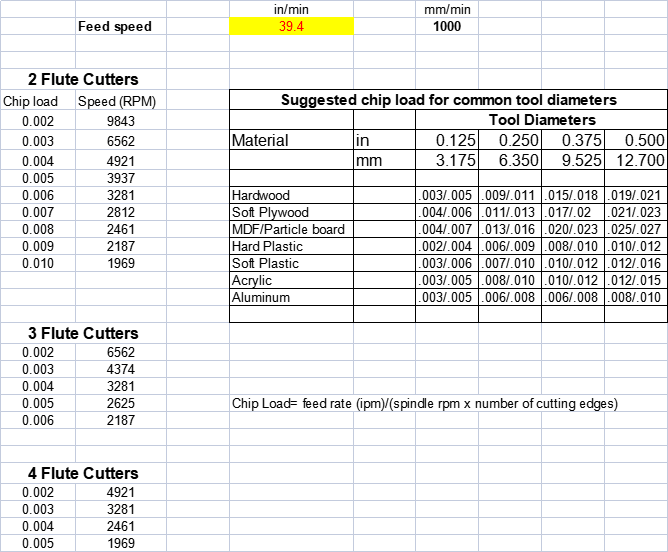
(Provide by Chandra S** D**, a member of Genmitsu FB Group)
This is a simple calculation of chip load based on data available over the internet. Please follow these steps to see if it works for you,
- ○ Step 1 - Type in Feed rate in in/min (mm/min will be calculated from it)
- ○ Step 2 - Pick the suggested chip load based on your material type and tool diameter. (min/max)
- ○ Step 3 - Based on number of flutes in your tool, choose the RPM which falls in the ideal range selected in Step 2
Note - Most DC motors have very low torque at lower RPM and may slow down or stop if RPM goes too low.
- Download calculation spread sheet here.
- Genmitsu End Mills Buyer Guide is updated, check it out.


